How to Check a UK Employer's Sponsor Licence: 5 Free Ways in 2026
Five free ways to check whether a UK employer holds a sponsor licence in 2026 — from the official GOV.UK file to checkers that work on the job page itself.
Quick answer
You can check whether a UK employer holds a sponsor licence for free, using the same public register in five different ways: download the official GOV.UK file, search a register index, use a browser extension on the job page, ask the employer directly, or cross-check the company's legal name through Companies House. The register check never costs money — anyone charging you to look it up is charging for convenience, not data.
Key takeaways
- The GOV.UK register of licensed sponsors is free, official, and public.
- Method matters by context: spreadsheet for deep dives, extension for daily
searching.
- Always try the legal name; the register does not use trading names.
- A licence is permission to sponsor, not a promise to sponsor you.
- "Not found" has four possible causes; only one means "cannot sponsor".
Method 1: the official GOV.UK register file
What it is
The Home Office publishes the Register of Licensed Sponsors: Workers on GOV.UK Source: GOV.UK — Register of licensed sponsors: workers. The file lists every organisation licensed to sponsor on Worker and Temporary Worker routes, with legal name, town, county, rating, and routes.
How to use it
- Open the GOV.UK page and download the latest register file.
- Search for the employer's legal name.
- Read the rating and route columns.
- Note the date of the file: the register changes on a rolling basis.
Pros and cons
| Pros | Cons |
|---|---|
| Official and complete | Large file, slow to search by eye |
| Free forever | No filters for route, sector, or location |
| No account needed | Legal names only — brand names miss |
Method 2: a free register search site
What it is
Register index sites repackage the same GOV.UK data with filters. A free search site lets you filter the register by route, sector, location, and rating without downloading anything.
How to use it
- Type the employer name.
- Read the entry: legal name, rating, routes, location.
- Filter the wider list when building a shortlist of employers.
Why it helps
The filters turn the register from a lookup into a research tool. Instead of checking one employer at a time, you can list every licensed employer in a sector and city in one screen.
A worked example: checking "Northgate Analytics"
The company name below is invented for illustration.
You are on a job page for "Northgate Analytics". A quick register search returns nothing. Before concluding, you run the two-step:
- Companies House finds "Northgate Analytics Ltd", registered in London.
- Searching that legal name on the register returns an entry: A rating,
Skilled Worker route.
The brand name missed; the legal name hit. That is a common sequence in sponsor checking, and it is why method 5 exists. If the legal name also misses, only then do you consider "no licence".
Method 3: a browser extension on the job page
What it is
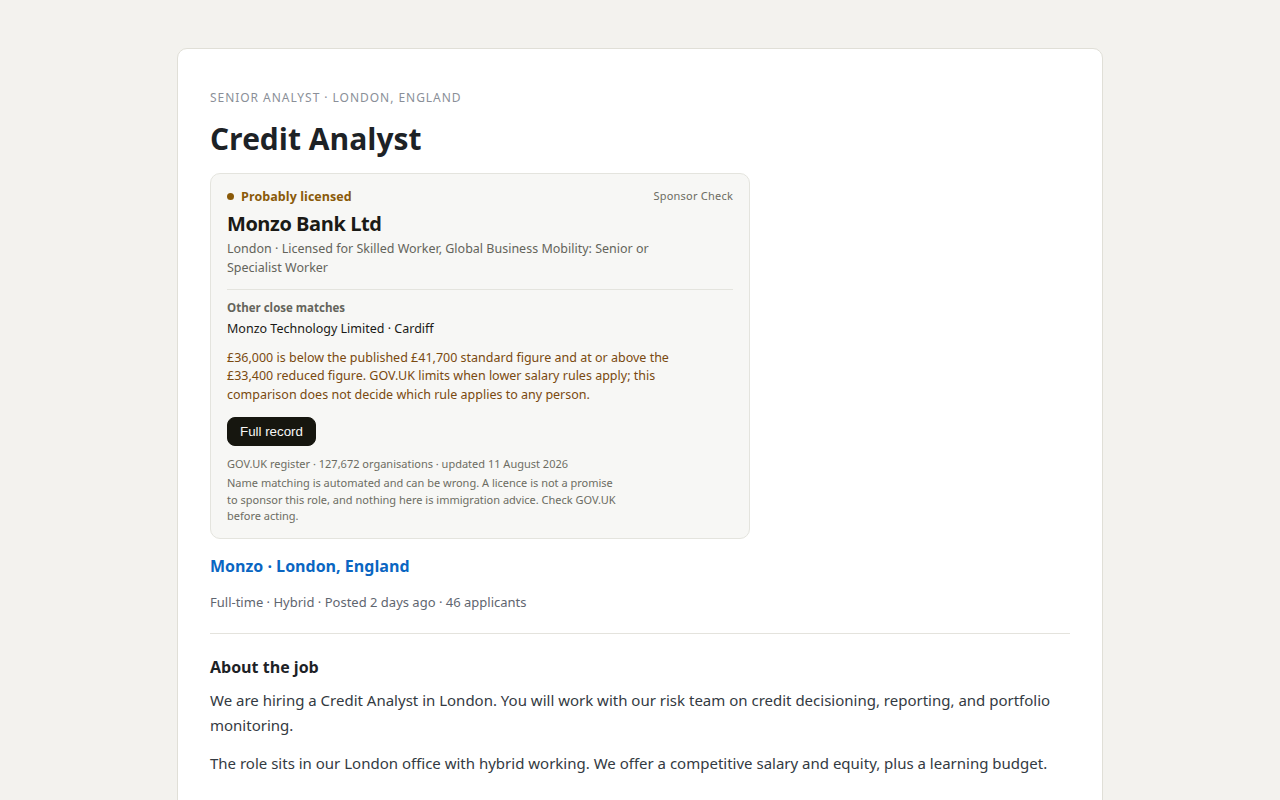
Sponsor-checker extensions read the employer name from the job page you are already viewing and match it against the register. The best ones keep the register inside the extension (127,672 organisations as of 11 August 2026), so checks run on your machine, offline, with no daily limit and no tracking. Read each extension's store listing before installing. For the full comparison of extensions and how to judge them, see our guide to Chrome extensions for UK job seekers.
How to use it
- Install from the Chrome Web Store or the developer's site.
- Open any job page on LinkedIn, Indeed, Reed, Totaljobs, Glassdoor,
CV-Library, or a supported career page.
- Read the badge: licensed sponsor, probably licensed, or not on the
register.
- Open the side panel for the full record, close matches, notes, and export.
Why it helps
The check happens in the flow of searching, not as a separate task. You stop asking "should I check?" and start checking every ad by default.
What the badge can and cannot say
The badge answers one question: is this employer on the register? It cannot answer whether the employer will sponsor the role — that is the employer's decision, role by role. A good checker says this on every surface: a licence is permission, not a promise. Tools that skip that sentence are tools that overpromise.
Method 4: ask the employer directly
What it is
The simplest free check is a direct question: "Does your organisation hold a UK sponsor licence, and can this role be sponsored?" Ask it early, in writing, and keep the answer.
How to phrase it
"I'm very interested in this role. Could you confirm whether the employer holds a UK sponsor licence and whether this role can be sponsored?"
When it works well
- The employer is on the register and you want confirmation for a specific
role.
- The ad is silent about sponsorship.
- A recruitment agency posted the ad (ask which employer it is, then ask
that employer).
Direct answers are not always accurate — recruiters sometimes guess — so pair the answer with a register check rather than trusting it alone.
Method 5: cross-check the legal name with Companies House
What it is
Companies House is the UK's free official register of companies Source: GOV.UK — Find and update company information. It gives you the legal name behind a brand, which is exactly what the sponsor register uses.
How to use it
- Search the brand name on Companies House.
- Note the registered company name (for example, "Tesco Stores Ltd").
- Search that name on the sponsor register.
Why it helps
It solves a common false negative: brand name vs legal name. "Not on the register" under the brand name is meaningless until you have tried the legal name.
The register entry, decoded
What you are looking at
When a lookup returns an entry, four fields answer your question:
- Legal name. The name the employer uses in law. Compare this to the ad
name before concluding anything.
- Rating. A means fully licensed. B means the sponsor is on a Home
Office action plan and generally cannot assign new certificates of sponsorship until it is resolved Source: GOV.UK — Workers and Temporary Workers: guidance for sponsors, part 3.
- Routes. Which visa routes the licence covers. The one you usually
want is Skilled Worker.
- Town. The licence address. It is not always where the job is.
The premium and SME variants
You may see ratings like "A (Premium)" or "A (SME+)". These describe the sponsor's service tier with the Home Office, not extra permission to sponsor you. Treat any A-rating variant the same way: fully licensed.
When two entries look identical
Large organisations sometimes appear multiple times — once per licence type or route. If you see two rows with similar names, read the route column and use the row that matches the role you are applying for.
Common mistakes when checking
The six errors
- Searching the brand name only.
- Using a stale copy of the register (check the data date).
- Reading the agency's licence instead of the employer's.
- Stopping at "licensed" and ignoring salary.
- Treating "not found" as "never will be".
- Paying for a check the public register does for free.
Each mistake creates a false conclusion in a different direction. Numbers 1–3 produce false negatives (you miss a real sponsor). Numbers 4–5 produce false positives (you chase a role that cannot be sponsored). Number 6 costs money for nothing.
The ten-minute rule
If a check takes longer than ten minutes, you are using the wrong method for the situation. One ad right now? Extension badge. Building a list? Filtered search. Verifying a strange result? GOV.UK file and Companies House.
What to do with the answer
If the employer is licensed
Check the rating and routes, then check salary and ad wording. A licence is the entry ticket, not the offer.
If the employer is probably licensed
Read the close matches in the panel. Compare towns, sectors, and legal names. Decide yourself; the tool is showing you its work, not making the call.
If the employer is not on the register
Try the legal name. Try again after the next register update. Then decide: watch the employer, or move on. An employer without a licence cannot sponsor you on a Worker route today — but licences are applied for all the time.
If the employer's rating is B
Ask the employer what the action plan means for this role. Check GOV.UK for the current rules on B-rated sponsors and certificates of sponsorship.
How the five methods compare on privacy
All five methods are free. They differ on what data you expose:
| Method | What it sends | Privacy |
|---|---|---|
| GOV.UK file | Nothing | Fully private |
| Register search site | The company name you typed | Depends on the site |
| Checker extension | Nothing (local matching) | Fully private when matching is local |
| Asking the employer | Your identity and question | Inherent |
| Companies House | The name you searched | Standard site logs |
For repeated checking, a checker that matches locally is the most private of the five: the pages you browse and the companies you check never leave your browser.
Checking on mobile
The same data, smaller screen
The register file is unwieldy on a phone, but the other methods work well:
- Open a free register search site in mobile Chrome — it is built for the
register, not for desktop spreadsheets.
- Use Companies House's mobile site to find legal names.
- Ask the employer directly from the app you are browsing in.
What does not work on mobile
The desktop extension does not run in the mobile Chrome app, so on-page badges are not available there. The manual popup check is desktop-only too. The method survives on mobile; the convenience does not.
How to report a wrong result
When to report
Checkers are only as good as their data and their matching. If you find:
- A licensed employer reported as not on the register — check the legal
name first, then report it.
- A non-licensed employer reported as licensed — report it immediately.
- A stale register version — check the data date the tool shows, then
report it.
How to report
Good tools accept reports through their own support channel. When you report, include the employer's legal name, the URL of the job page, and the verdict you saw. A careful team re-verifies against the GOV.UK file before changing anything — the register, not the report, is the source of truth.
The general rule
Whichever tool you use, keep the receipts: the job page URL, the verdict, and the date. If a result matters for a decision, a second method should confirm it before you act.
Which method should you use?
The decision table
| Situation | Fastest free method |
|---|---|
| Checking one ad right now | Extension badge (Method 3) |
| Building a shortlist of employers | Register search filters (Method 2) |
| Verifying a specific company deeply | GOV.UK file (Method 1) |
| Agency posted the ad | Ask the agency, then check the end employer (Methods 3–4) |
| Brand name not matching | Companies House, then the register (Method 5) |
The accuracy caveat
Every method reads the same data, so they share the same limits:
- The register uses legal names.
- Entries change between updates.
- A licence is not a promise to sponsor any role or person.
When a result surprises you, run a second method before acting on it.
The bottom line
Checking a UK employer's sponsor licence is free, official, and takes seconds once you know where to look. Use the GOV.UK file for depth, a search site for shortlists, an extension for speed, a direct question for confirmation, and Companies House for name mismatches. Remember the one rule that makes the whole exercise safe: a licence is permission, not a promise. Nothing here is immigration advice — route and eligibility questions belong with GOV.UK or a regulated adviser.
Frequently asked questions
Is it free to check if a company has a sponsor licence?
Yes. The register is public data on GOV.UK. Free tools that use it include register search sites and checker extensions.
How do I check a company's sponsor licence in the UK?
Search the employer's legal name in the GOV.UK register file, a free register search, or a checker extension on the job page. Try the legal name if the brand name finds nothing.
What does it mean if a company is not on the sponsor register?
It means no entry matched. Possible causes: the legal name differs, the licence is new, the employer has no licence, or the checker missed. Only one of those means "cannot sponsor today".
Can I check a company's sponsorship history?
Not officially. The Home Office publishes aggregate sponsorship data, not per-company history. Anyone showing you a company's "history" is estimating.
Do I need to pay for a sponsor check?
No. Every method in this guide is free. Paid tools add convenience and ad-reading features, not register data.
What is the difference between a sponsor licence and a sponsorship offer?
A licence is permission to sponsor. An offer of sponsorship for a specific role is the employer's decision, made role by role, and a visa application is then decided by the Home Office.
How do I check a company that is not a limited company?
The register includes charities, NHS trusts, universities, and public bodies. Search their full official name on the register file; Companies House only covers registered companies, so use it for limited firms only.
Why does the register sometimes show a different town than the job?
The register shows the licence address, which is not always where the job is. Do not treat a town mismatch as a mismatch of the employer.
Can a checker extension check a company I type manually?
Yes. Many checker extensions have a toolbar popup that looks a company up by name on any site, not just supported job boards.
Is the register data in these tools always current?
No tool can be perfectly current because the register itself changes constantly. Check the data date a tool shows. A good tool refreshes from GOV.UK regularly and states the register version on its surfaces.
What if the employer uses a foreign parent company name?
Search both names. The UK entity is usually the one with the licence, because sponsor duties attach to the UK employing entity. If only the parent is licensed, ask which entity would employ you and whether that entity can sponsor.
Can a B-rated employer sponsor me?
Generally no, until the action plan is resolved. Confirm the current rules on GOV.UK, and ask the employer directly what the rating means for the role.
Do I need to re-check after I apply?
Yes. Check once before applying and again before accepting an offer. Licences are granted, suspended, and revoked on a rolling basis; the entry you saw in week one may not be the entry in week eight.
Can I check an employer without any tools at all?
Yes. Ask the employer directly whether they hold a sponsor licence, then verify the answer against the GOV.UK file or a free search site. Tools make the check faster and more consistent; the data is public either way.
What if two companies share the same name?
Use the town and county fields to tell them apart, and check the legal name on Companies House. If two entries still look identical, ask the employer which entity holds their licence.
How long does a sponsor licence last?
There is no fixed expiry on the public register as such — licences continue while the sponsor meets its duties, and entries are removed or updated when licences end. That is why the check needs repeating: the register is a current snapshot, not a permanent record.
Last reviewed 2026-08-06 by Job Search Tools UK Editorial Team. Figures on this page are checked against GOV.UK on the review date. Rules, fees, and salary floors change — always confirm against GOV.UK before you act. Spotted an error?
Check the employer without leaving the job advert
- See the legal sponsor name, town, routes, rating, and close matches on the page.
- Your checks and job-page text stay on your computer; the extension makes no network requests.
Our product. Sponsor Check is the browser extension sold by THINKINGAI LIMITED, the company identified in this site's footer. The register itself remains free, official, and public. This site is information only, not immigration advice.