How to Evaluate Any UK Job-Search Tool
A four-question method for judging any UK job-search tool: what it does, what it costs, what data it sees, and what its limits are.
Quick answer
Judge any UK job-search tool with four questions: what it does, what it costs, what data it sees, and what its limits are. The same questions work for browser extensions, websites, apps, and paid subscriptions alike. The point of the method is not to prove a tool is good or bad but to know what you are installing, what it will cost, what it can read, and what it cannot do. A tool that cannot answer one of the four is a question you carry into your next action, not a mystery to install past.
Key takeaways
- The four-question method is a habit, not a ranking of tools.
- "What it does" comes first, before price and privacy.
- Refresh on the fourth question: every tool has a limit, and a tool that will
not say its limits are is one to read more closely.
- Apply the same four questions to tools you already run, and re-ask them when
a tool updates.
- The official register itself is public and available without charge.
- A sponsor licence is permission to sponsor, not a promise to sponsor any role
or any person.
Disclosure
This site is published by the team behind a UK job-search browser extension that checks employers against the sponsor register, so we have a commercial interest in the job-search tools category discussed here. We are not neutral in that sense, and this article does not claim to be impartial or independent in its view of named products. What it offers instead is a repeatable set of questions you can apply to any tool — including ours — and verify for yourself against the official sources cited at the end.
Why a method beats a list of opinions
The honest problem
Store listings describe products from the publisher's point of view. A ranked list can also age as products, prices, and policies change. Different tools suit different people; a freelance developer researching a handful of employers may not need the same features as a graduate managing many applications.
The four-question method sidesteps the "choose a winner" trap entirely. It does not rank tools. It gives you the same dependable questions to ask of any tool, so you can compare them on your own terms rather than on a marketer's.
The four questions at a glance
- What does the tool do?
- What does it cost?
- What data does it see?
- What are its limits?
Each question narrows the decision in a different way. Work through them using the store listing, pricing terms, and privacy disclosures.
Question one: what does it do?
The one-sentence test
Ask the tool's maker to state in a single sentence what it does. "It matches the employer on a job page against the sponsor register" is a sentence. "It helps with my job search" is not. The test separates tools with a genuine job from tools whose description never quite resolves into one.
If you cannot describe what a tool does after reading its listing, either the listing is vaguer than it should be or the tool does a lot of things loosely. Both are worth knowing before you install.
Does it do the thing you actually need?
Match the tool to a concrete need rather than to a category. Instead of asking "is this a sponsor checker?", ask "does this check the employer on this job page against the official register?" A tool can sit in a sensible category and still not do the specific thing you need.
Question two: what does it cost?
Free is not the same as no cost
The first cost question is the headline price. But "free" has real edges:
- What does the free tier do, and what does it leave out?
- What moves you to a paid tier?
- Is there a free trial, and does it auto-renew?
- What happens to your data and access if you cancel?
For tools that hold public data, remember the underlying data itself is free. The register of licensed sponsors is published by the Home Office and open to anyone Source: GOV.UK — Register of licensed sponsors: workers. The official register therefore provides a free baseline for comparing what a paid tool adds, such as convenience, automation, or analysis. Our guide to free versus paid job-search tools works through what is worth paying for in a UK search.
Separate a service fee from an outcome promise
A legitimate fee for software access or an optional service is different from a payment demanded in return for a promised job, sponsorship, or visa outcome. GOV.UK explains the rules on fees charged to work-seekers and how to complain Source: GOV.UK — Complaints about recruitment agencies. If a paid service offers case-specific immigration guidance, check whether the adviser is regulated Source: GOV.UK — Find an immigration adviser. Our guide to visa job scam warning signs covers other patterns to examine. This article cannot determine whether a particular charge is lawful.
Question three: what data does it see?
The read this before you install question
A job search is sensitive in an ordinary way: the pages you look at reveal who you are considering, when, and in what order. So the data question is simple and worth giving real weight.
Ask, in plain terms:
- What does the tool read or collect?
- Does processing happen on your device, or does data leave your device?
- If data leaves, where does it go, who can read it, and how long is it kept?
- Is there an account, and what does it store?
For browser extensions, start with the permission warning and the privacy disclosures. The permission warning describes capabilities the extension is allowed to use; the privacy section records what the publisher declares about data handling. Neither, on its own, proves how the extension behaves. Our guide to browser permissions for job-search extensions explains how to read both.
Data reads are not a verdict
Access to page data may be necessary for a page-aware feature. The question is scope: which data and sites can the extension access, when does that access run, and does the explanation match the feature? Compare the permission warning with the publisher's disclosures before deciding whether the scope is acceptable to you.
Question four: what are its limits?
The question everyone skips
Every tool stops somewhere, and finding where is more useful than finding what it automates. A sponsor checker has limits — it cannot tell you whether an employer will sponsor you, whether you meet a route's requirements, or whether a salary clears the applicable floor for your situation. At most, a register lookup can report whether its matching process found an organisation in the version of the register it used.
Ask what a tool cannot do as well as what it can. A tool that will not engage with its own limits, or that implies a certain outcome, is a tool to question — no tool can assure a job, a visa, or a sponsorship. A sponsor licence is permission to sponsor; it is not a promise to sponsor any role or any person.
Where to find the answers to the limits
The store listing and pricing page should state what a tool does and costs. If freshness affects the result, look for the data version or update method. If the publisher does not provide enough information to assess a limitation that matters to you, leave that question marked as unanswered rather than filling the gap with an assumption.
Applying the four questions in practice
Before you install or subscribe
- Purpose: describe the feature in one sentence; does it match the need you
actually have?
- Price: list the free tier, the paid tier, the trial, and the exit.
- Data: read the privacy section and the permission list; state where
processing happens.
- Limits: find what it will not do, and confirm nothing promises a certain
outcome.
After a period of real use
Re-ask the same four questions with the benefit of real use:
- Is it doing the thing I needed, or just a thing?
- Has the cost stayed what it was?
- Has anything changed in what it collects when it updated?
- Where have I actually hit its limits?
Tools change. Re-run the questions after a material update, a pricing change, or a new permission request, and periodically for tools you continue to use.
Free ways to check an employer directly
The four-question method is most useful when you still have an option that costs nothing and reads only official data: check the employer yourself against the register. Our guide to checking an employer's sponsor licence for free shows the manual route. Doing it once tells you a lot about what a "convenient" tool is actually adding — and what it is not.
When a tool fails the questions
Failure does not always mean the tool is bad; it often means you could not get a clear answer, which is itself useful information.
| If the answer is unclear | What remains unknown |
|---|---|
| "It helps with job searching" | The concrete feature is not clear from that wording |
| "Pricing on request" / "free, just pay later" | The total cost and payment trigger need clarification |
| No clear privacy disclosure | You cannot yet assess what the tool collects or sends |
| "Guarantees interviews / visas / sponsorship" | The tool is promising what no tool can |
| No data version or update method | You cannot yet assess freshness |
None of these is proof a tool is malicious. They are reasons to slow down and answer the missing question yourself before you decide.
The four questions for a browser extension
Reading what the browser shows you
Browser extensions are the class of tool where the four questions map directly onto what the browser and the store listing tell you up front. Three signals answer most of the first and third questions before you install anything:
- The permission warning, shown at install and in the extension's details,
describes categories of access the extension may use. Google explains that a warning signals capability and is not, by itself, a finding that an extension is dangerous Source: Google — Permissions requested by apps and extensions.
- The store listing's privacy section records what the publisher declares
about collection and use.
- The developer's privacy policy, when linked, may add detail about where
data goes, why it is processed, and how long it is kept.
Across those three sources you can usually answer "what does it do?", "what data does it see?", and a good part of "what are its limits?" before investing any time. For a walk through what each permission wording means in practice, see our guide to browser permissions for job-search extensions.
The scope test
Scope is one useful signal: which sites can the extension access, and can you limit that access? Chrome documents controls for allowing an extension on click, on specified sites, or on all sites Source: Google Chrome Help — Install and manage extensions. Compare the requested scope with the feature, and use the narrowest setting that still supports the way you choose to use it.
Where processing happens
Whether an extension matches data on your device or sends it to a server is a meaningful difference for the same feature. Remote processing may support different functionality, but it also creates a different data flow. Look for the publisher's declaration in the privacy disclosures: a permission warning describes access capability, not the destination of data.
Applying the method to websites and apps
The same four questions transfer to job-search websites and mobile apps with a small mapping:
| Question | For a website | For an app |
|---|---|---|
| What does it do? | The homepage and a concrete use | The store description and a concrete use |
| What does it cost? | Pricing and sign-up pages | The in-app purchase list |
| What data does it see? | The privacy policy and account defaults | The app-store privacy labels |
| What are its limits? | What the free tier and filters omit | What the app will not do |
Websites and apps expose different evidence from extensions, so do not treat privacy labels or policies as technical permission prompts. Use each surface to answer what it actually discloses, and leave unsupported answers blank.
When to verify against the official source
The register is the ground truth
The official reference for whether an organisation appears as licensed is the Register of Licensed Sponsors: Workers published by the Home Office Source: GOV.UK — Register of licensed sponsors: workers. You can check the public file directly and compare that result with what a tool shows, while remembering that name matching can still require judgement. That comparison helps you assess what the tool adds and which version of the data it uses. Our guide to checking an employer's sponsor licence for free shows the manual route end to end.
When to add a manual check
Before relying on a result for a consequential decision, open the current official file and verify the organisation, route, and rating shown. This reduces uncertainty about the tool's data version, but it does not establish employer intent, role eligibility, or your personal eligibility.
Building the habit so it sticks
Make it a review, not a project
You do not need to evaluate every tool on the market — only the ones you are about to use. As a habit, the four questions take a few minutes each and need no special equipment. Schedule a light pass whenever you try a new tool, and a fuller re-pass of the tools you run every quarter or two.
Keep a short note
Save a short note per tool you considered: the four answers and whether you used it. Over time this becomes a personal record of the evidence and trade-offs you actually considered.
The decision is yours
The method hands you the information and leaves the choice to you — which is deliberate, because only you know your budget, your comfort with data, and the shape of your search. A tool that suits one candidate perfectly can be the wrong shape for another, and the four questions are how you tell the difference for yourself.
The bottom line
Any UK job-search tool can be assessed with four questions: what it does, what it costs, what data it sees, and what its limits are. The method works on extensions, websites, and apps, and on tools you already run as much as ones you are considering. It will not hand you a ranking, and it is deliberately not an endorsement of any product — this site is published by the team behind a job-search tool and is not independent or neutral in that sense. What it gives you is a way to decide for yourself using official sources, and to know what no tool can promise you. This page is information, not immigration advice. This site is not affiliated with the Home Office or GOV.UK. For advice about your circumstances, use an adviser registered with the Immigration Advice Authority or another appropriately regulated legal professional.
Frequently asked questions
How do I evaluate a UK job-search tool?
Ask four questions: what it does, what it costs, what data it sees, and what its limits are. Answer each against the listing, the pricing page, and the privacy disclosures, then decide on your own terms.
Should I pick the most popular job-search tool?
Popularity measures adoption, not fit. Apply the four questions to any tool regardless of user count; what matters is whether it does the thing you need within a cost and data scope you accept.
Is a job-search tool that costs money better than a free one?
Not automatically. For sponsor checking, the official register provides a free baseline. Compare a paid tier on the feature, total cost, data handling, and limits that matter to you rather than treating price as a quality signal.
What data can a sponsor checker read?
Its permissions describe what it can access; the exact data used depends on the feature and implementation. Read the permission warning alongside the store privacy disclosure and developer policy, and do not assume that a broad capability proves either collection or non-collection.
Can a tool tell me whether an employer will sponsor me?
No. A tool can say whether an employer appears on the register. A licence is permission to sponsor, not a promise to sponsor any role or any person, and no tool can see an employer's intentions.
Is the sponsor register data free?
Yes. The Home Office publishes the Register of Licensed Sponsors: Workers for public viewing and download. A commercial tool may add matching, presentation, or other features, but the official file remains available directly.
What does "processed locally" mean?
It usually claims that a particular operation happens on your device rather than on a remote server. It does not necessarily describe analytics, accounts, updates, or every other data flow. Check exactly which feature and data the publisher's statement covers.
How often should I re-evaluate a tool?
Re-ask them after a material permission, account, pricing, ownership, or privacy change, and periodically for a tool you continue to use. There is no universal calendar interval.
What is a reasonable red flag in a tool's pricing?
Unclear total cost, renewal terms, cancellation, or the point at which a trial becomes paid all deserve clarification. A promised job, sponsorship, or visa outcome is not the same thing as an ordinary software feature or regulated professional service.
Do I need a tool to check sponsors at all?
No. You can check an employer against the official register directly. A tool may add matching or presentation, but you can compare its result with the current public file and assess whether that added feature is useful to you.
What is a central limit of a sponsor checker?
It can only match a name against a public register snapshot. It cannot tell you whether the employer hires internationally, whether the role is sponsored, or whether you meet the requirements of a route.
Should I trust a tool that promises a visa outcome?
No. No tool or employer can promise a visa outcome, and anyone offering a firm outcome is promising something a tool cannot deliver. Treat any such promise as a strong reason to pause.
Are the four questions useful for non-sponsorship tools too?
Yes. The same questions can be applied broadly to CV, salary, and application tools: purpose, cost, data, and limits. The evidence available will differ by product type.
Is this article an endorsement of any named product?
No. This site has a commercial interest in the category, so we deliberately offer a method you can apply rather than recommend named third-party tools. Verify everything yourself against the official sources.
Last reviewed 2026-08-09 by Job Search Tools UK Editorial Team. Figures on this page are checked against GOV.UK on the review date. Rules, fees, and salary floors change — always confirm against GOV.UK before you act. Spotted an error?
Check the employer without leaving the job advert
- See the legal sponsor name, town, routes, rating, and close matches on the page.
- Your checks and job-page text stay on your computer; the extension makes no network requests.
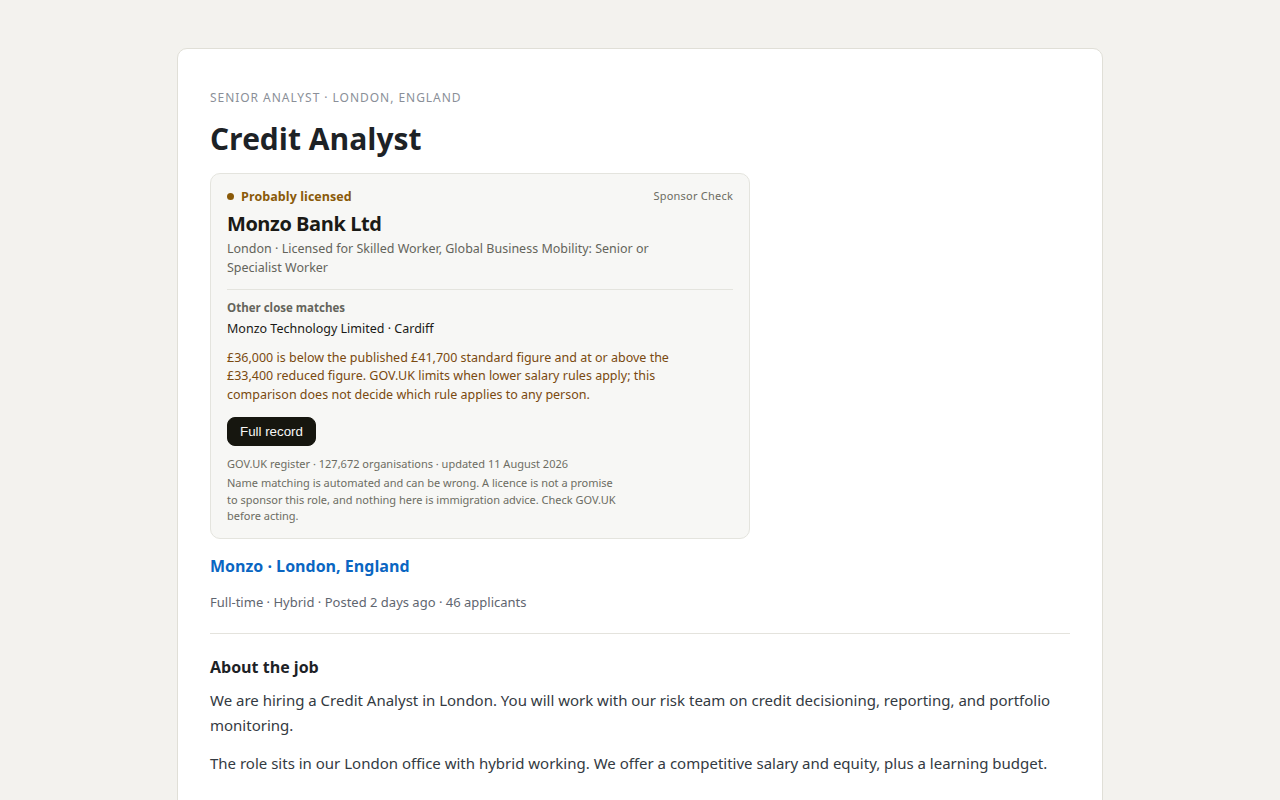
Our product. Sponsor Check is the browser extension sold by THINKINGAI LIMITED, the company identified in this site's footer. The register itself remains free, official, and public. This site is information only, not immigration advice.