The Chrome Extensions Worth Using for UK Job Seekers in 2026
Chrome extensions worth using for a UK job search: sponsor checkers, autofill, ATS resume tools, and writing helpers — with privacy and limits for each.
Quick answer
The Chrome extensions worth installing for a UK job search do one of four jobs: check the employer against the UK sponsor register, autofill applications, match your CV against a job description, or clean up your writing. For international candidates, the sponsor checkers are the category that matters most — but only if they state their data source and their limits.
Key takeaways
- Sponsor checkers differ by data source, coverage, and privacy. Read all
three before installing.
- The GOV.UK register is the only official per-employer source. Anything
claiming "sponsorship history" is estimating.
- AI-powered Chrome extensions with 1,000+ users nearly doubled between 2025
and 2026 — the category is young and uneven.
- Permission lists matter: a checker that uploads your job pages cannot call
itself private.
- No extension can tell you whether an employer will sponsor you.
What to check before installing anything
The three questions
- What data does it read? A sponsor checker needs the employer name on
the page. Anything reading your whole job search needs a good reason.
- Where does the data go? Local matching is private. Cloud matching
means the pages you visit leave your browser.
- What is the source? The GOV.UK register of licensed sponsors is the
official source. "Proprietary databases" need scrutiny Source: GOV.UK — Register of licensed sponsors: workers.
Why this matters more in 2026
The extension market is growing fast: the number of AI-powered Chrome extensions with at least 1,000 users nearly doubled from 238 to 442 between 2025 and 2026 Source: About Chromebooks — ChromeOS app ecosystem statistics, 2026. New tools arrive weekly, and quality varies wildly. A tool's store rating is not a data policy.
How to read a store listing
Before installing any job-search extension, check four things on its store page:
- Permissions. Chrome lists them under "View details". A checker should
need the sites it works on, nothing more.
- Data claims. Does the developer say where data is stored? Local
storage and server storage are different privacy promises.
- Last updated. A checker with a stale register needs a stated refresh
mechanism.
- Support. Is there a working website and contact? Dead support pages
are a warning sign.
Five minutes on the store page saves you from a tool that reads everything and tells you nothing.
A worked example: permission-spotting
The tools below are real; the walkthrough is illustrative.
You are comparing two sponsor checkers. Both list "Read and change data on linkedin.com" in their permissions.
Tool A's listing says matching runs locally and the extension sends nothing to a server. Its only network request is a register update check. That permission is proportionate: it needs to read the employer name on the page.
Tool B's listing says it "uses AI to analyse listings" and its privacy page mentions cloud processing. The same permission now means your LinkedIn pages leave your browser.
Same permission, different privacy. The store listing is where you tell the difference.
The sponsor checkers compared
What they do
Sponsor checkers read the employer name on a job listing and compare it against a database of licensed sponsors. Here is how the main UK options line up, based on their own store listings. For the free checks behind each one — the GOV.UK file, register search sites, and direct questions — see how to check an employer's sponsor licence for free.
| Extension | Where it works | Source it cites | Notes |
|---|---|---|---|
| UK Visa Sponsor Checker for LinkedIn | Home Office register | LinkedIn-focused checker | |
| UK Company Visa Sponsorship Verifier | LinkedIn, Indeed, Glassdoor | Sponsorship licence data | Released 2025 |
| Sponsor Spotter | Sponsor licence data | Adds company insight fields | |
| Ultimate UK Visa Sponsor Checker | Job listings | Claims sponsorship history | History claims need caution |
| UK Visa Sponsorship Checker (AI) | AI-assisted checks | AI features vary |
The honesty check
One item needs a special warning. Some checkers claim to show "companies that have or have not sponsored UK visas in the last couple of years". The Home Office does not publish per-company sponsorship history; it publishes aggregate data Source: GOV.UK — Immigration system statistics. Any tool showing a "history" is inferring it. Treat those numbers as estimates.
How the checkers actually differ
The table hides one important difference: what each checker does with a name it cannot match. The reliable ones say "not found" and show close matches. The less careful ones guess — and a guess on sponsorship is worse than no answer. When you test a checker, try a company with a brand name different from its legal name (a bank or a consultancy) and see how it responds. That single test tells you more than any feature list.
The best checkers are explicit: below a confidence threshold they return no sponsor at all rather than a best guess, and short of certain they show the runner-up candidates so you can decide.
The UK-specific pick: what to look for
The register matters more than the polish
A UK sponsor checker is only as good as its source. The GOV.UK register is updated on a rolling basis, and a checker that ships a stale copy will silently mislead you. Check whether the tool states its data version and how often it refreshes.
Where the tools disagree
Different checkers cover different sites. A checker that only works on LinkedIn misses the large share of roles posted on company career pages. Checkers that cover applicant tracking systems (Greenhouse, Lever, Ashby, Workday, SmartRecruiters, Teamtailor, Workable, Recruitee, Pinpoint) cover more of the actual market.
Coverage varies: some checkers work on LinkedIn only, while others cover the main boards and the ATS career pages listed above, plus a manual lookup in a toolbar popup. Read the store listing to confirm what each tool covers. The underlying register should always remain accessible free through GOV.UK. Extensions may charge for the convenience of checking it automatically, so compare the free allowance, paid limit, privacy, and renewal terms Source: GOV.UK — Register of licensed sponsors: workers.
The non-sponsor extensions that help
Application autofill
Simplify Copilot autofills job applications and tracks them in one place Source: Simplify Copilot — Chrome Web Store. Autofill saves the most tedious minutes of a job search — but it stores your profile data with the vendor. That is a reasonable trade, once you know it.
CV-to-ATS matching
Jobscan's extension compares your CV against a job description and highlights missing keywords Source: Jobscan — Job Tracker extension. Useful for tailoring applications. Remember that matching a keyword list is not the same as being qualified.
Writing helpers
Text Blaze stores reusable text snippets for covering letters and messages Source: Text Blaze. Grammarly and LanguageTool catch writing errors. These are low-risk, high-convenience additions.
The tracker
Every serious job search needs a tracker. A simple spreadsheet works; some checker extensions keep the last checks — jobs opened and companies looked up — with notes, and export them to a spreadsheet. Use whichever you will actually update.
The weekly workflow
Here is a realistic weekly routine with these tools:
- Monday: open your tracker, review last week's applications.
- Tuesday: run the sponsor checker across new roles on two job boards.
- Wednesday: shortlist roles from licensed employers; check salary
against the floors.
- Thursday: tailor CVs with the ATS matcher; write cover letters with
the snippet tool.
- Friday: autofill and submit the week's strongest three applications; log
everything.
Extensions earn their place when they fit a routine, not when they sit in the toolbar. Three focused tools beat eight installed ones.
The data-policy decoder
What store pages actually say
Store listings use phrases that sound similar and mean different things. Here is the decoder:
| Phrase | What it usually means |
|---|---|
| "Processed locally" | Your pages stay on your device |
| "Processed securely" | Your pages leave your device, then get stored safely |
| "No data collected" | Usually means no account data — page content may still be read |
| "Improve the product with your data" | Usage data is being sent somewhere |
| "Uses AI to analyse listings" | Listings are being sent to a model, often in the cloud |
The two that matter most for job search: "processed locally" and "uses AI". One keeps your search private; the other tells you exactly where your search is going. Neither is automatically bad — but they are different products, and the difference is worth five minutes of reading.
The permission checklist for job-search extensions
- Does it need the sites it works on? Yes, that is normal.
- Does it need all sites? Suspicious.
- Does it need clipboard, downloads, or identity? Only with a stated reason.
- Can you revoke access without uninstalling? Chrome lets you remove site
access per extension — do that for anything you stop trusting.
How to audit what you already have installed
The quarterly clean-out
Once a quarter, open chrome://extensions and run this pass:
- List every extension with a job-search purpose.
- Ask: have I used it in the last 30 days? If no, remove it.
- For the rest, open the permissions and check they match the original
listing.
- Check the store page for the "last updated" date. Tools that stopped
updating a year ago are riskier, not safer.
- Uninstall anything you cannot explain to yourself in one sentence.
Extensions accumulate silently and keep their permissions while they sit unused. The clean-out is not housekeeping; it is a privacy decision you make every quarter.
The one-sentence test
If you cannot say what an extension does in one sentence, you should not have it installed. "It checks the employer against the sponsor register" is a one-sentence tool. "It helps with jobs" is not.
The comparison table: which do you need?
| Goal | Best category | Example |
|---|---|---|
| Check if the employer can sponsor | Sponsor checker | A checker using the GOV.UK register |
| Fill applications faster | Autofill | Simplify Copilot |
| Tailor your CV per role | ATS matcher | Jobscan |
| Write cleaner messages | Writing helper | Grammarly / Text Blaze |
| Remember what you applied for | Tracker | Spreadsheet or extension sidebar |
Install in that order: the checker first, because it changes which roles you apply to at all.
What a paid checker is actually selling
The free-data rule
The register of licensed sponsors is public data published by the Home Office. Nobody has a private copy that unlocks more information. A paid checker is therefore selling speed, automation, page coverage, and workflow — not exclusive access to government data. Judge the price on time saved, and use the free GOV.UK file whenever the convenience is not worth paying for.
What tools can legitimately charge for
Paid features that add real value:
- Reading the job ad for sponsorship wording, agency signs, and salary
floors (a legitimate paid feature in some tools).
- CV tailoring, application autofill, and tracking dashboards.
- Convenience: filters, alerts, and multi-site coverage.
The pricing sanity check
Before paying for any job-search tool, ask:
- What exactly does the paid tier add?
- Is that feature something the free GOV.UK data could ever provide?
- Is the price one-off, subscription, or per-check?
If the answer to question two is "the same data, faster", the free tier is probably fine. If the answer is "a check that reads the ad", that is a different, legitimate product.
The bottom line
The extension that matters most in a UK job search for international candidates is the sponsor checker — because it changes which roles you consider, not just how fast you fill forms. Pick one with an official source, local matching, and stated limits. Add autofill, an ATS matcher, and a tracker for the busywork. Skip anything that promises outcomes no tool can deliver. Reviews here are informational, not immigration advice: route and eligibility questions belong with GOV.UK or a regulated adviser.
Frequently asked questions
Which Chrome extension should I use to check UK visa sponsorship?
The right checker for your case is the one with an official source, fresh data, and clear privacy. Compare the current store listings, prefer a checker that uses the GOV.UK register and matches locally, and check its free allowance and paid limit before installing.
Are sponsor checker extensions safe?
Read the permissions. A checker that matches locally does not send your job pages anywhere. A checker with server-side matching does. Both can be safe; only one can promise privacy.
Do these extensions guarantee I will find a sponsored job?
No. They check whether an employer is licensed. Whether a role is sponsored depends on the employer, the role, and the visa decision. Any tool promising more is overpromising.
Do I need a paid extension to check the register?
No. The register itself is public and free on GOV.UK. Checker extensions may offer a limited free trial and charge for unlimited automatic lookups, while some also add advert-reading or workflow features.
Can extensions read the salary requirement?
Some can compare an advertised salary against the published floors (£41,700 standard, £33,400 reduced for the Skilled Worker route Source: GOV.UK). That is useful, but route guidance on GOV.UK stays the source of truth.
How many extensions should I install?
Start with two: a sponsor checker and a tracker. Add an autofill tool and a writing helper only if your applications are actually bottlenecked there. Every extension is an attack surface and a distraction; install the minimum that changes outcomes.
What if an extension asks for permission to read all websites?
Ask why. A sponsor checker does not need all-website access. Broad permissions on a job-search tool are a privacy cost you are paying for a feature you do not need.
Can extensions be removed cleanly?
Yes. Uninstall from chrome://extensions. If an extension stored local data in your browser, removing it removes that data. If you want to keep your application history, export it before uninstalling.
Do I need an extension at all?
No. The register is public data you can check by hand. Extensions exist to make the check instant and consistent. Start without them if you prefer — the method matters more than the tool.
Should I pay for a sponsor checker?
Only if the automation saves enough time to justify the price. The underlying register remains free on GOV.UK, so you are paying for convenience, page coverage, and workflow rather than access to otherwise hidden data.
Are subscription job-search tools worth it?
Sometimes, for features like application tracking and CV tailoring. Treat subscriptions like any other cost: calculate what they add per week and cancel what you do not use.
Are these extensions safe with my LinkedIn account?
Check the permissions before installing. Reading the employer name on job pages is normal; posting, messaging, or changing your profile on your behalf is not. Revoke site access for anything you stop trusting.
Which extension should I install first?
The sponsor checker. It changes which roles you consider at all, while autofill and writing tools only change how fast you apply. Install the checker, use it for a week, then decide what else earns a place.
Do sponsor checkers work on company career pages?
Only if the extension covers those sites. Some checkers cover the main ATS career pages (Greenhouse, Lever, Ashby, Workday, and similar). For any other page, a manual popup lookup works anywhere.
Last reviewed 2026-08-06 by Job Search Tools UK Editorial Team. Figures on this page are checked against GOV.UK on the review date. Rules, fees, and salary floors change — always confirm against GOV.UK before you act. Spotted an error?
Check the employer without leaving the job advert
- See the legal sponsor name, town, routes, rating, and close matches on the page.
- Your checks and job-page text stay on your computer; the extension makes no network requests.
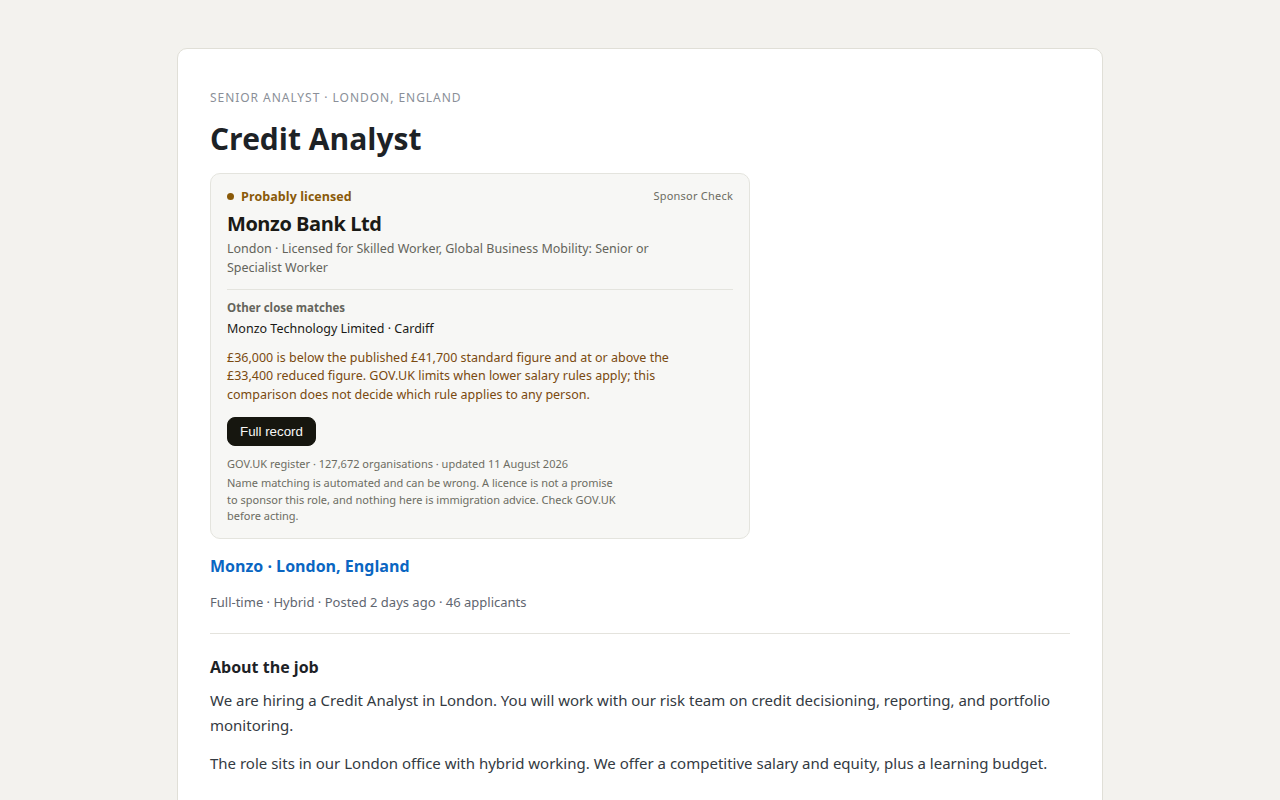
Our product. Sponsor Check is the browser extension sold by THINKINGAI LIMITED, the company identified in this site's footer. The register itself remains free, official, and public. This site is information only, not immigration advice.
Sources
- Register of licensed sponsors: workers — GOV.UK
- ChromeOS app ecosystem growth statistics — About Chromebooks
- Immigration system statistics, year ending December 2025 — GOV.UK
- UK Visa Sponsor Checker for LinkedIn — Chrome Web Store
- UK Company Visa Sponsorship Verifier — Chrome Web Store
- Sponsor Spotter — Chrome Web Store
- Ultimate UK Visa Sponsor Checker — Chrome Web Store
- Simplify Copilot — Chrome Web Store
- Jobscan — Job Tracker
- Text Blaze
- Skilled Worker visa: your job — GOV.UK