Job Application Trackers: Spreadsheet, App or Extension
Spreadsheets, dedicated apps and browser extensions for tracking UK job applications: what each does well, what they cost you, and the fields that matter.
Quick answer
For most UK job seekers a spreadsheet is enough, and it is the only option that keeps your data entirely under your control. Dedicated tracker apps add reminders, pipelines, and analytics but ask you to hand over your job-search history. Browser extensions save the most time by capturing listings as you browse, and cost the most privacy, because they can read the pages you visit. Choose by how many applications you send: under about thirty, a spreadsheet wins on simplicity; above that, automatic capture starts to pay for itself. The fields you track matter far more than the tool you track them in.
Key takeaways
- The tool that gets updated beats the tool with better features.
- A spreadsheet keeps your data local and costs nothing.
- Extensions save real time and see real data — read their permissions.
- Track the sponsorship fields, not just the job fields: licence status,
rating, and the date you checked.
- Dated notes are the whole point. Undated notes are useless in six weeks.
- No tracker improves your chances. It stops you wasting effort and repeating
yourself.
Disclosure
This site is published by the team behind a UK sponsor-search tool, which is a browser extension. That means we have a commercial interest in one of the categories reviewed below. We have tried to be even-handed, and we recommend spreadsheets for most people, but read this with that interest in mind.
Why tracking matters more when you need sponsorship
An ordinary job search is a numbers game with a short memory. A sponsorship- dependent search is a research project.
You are not just recording "applied on Tuesday". You are recording whether an employer held a sponsor licence on the day you checked, what rating it had, which routes it covered, and what the salary was against the going rate. All of those change. The register file updates almost daily.
Six weeks later, "I think I checked them" is worth nothing. "Checked 12 June, A-rated, Skilled Worker route" is worth a lot — it tells you whether to re-check, and it stops you re-researching the same company three times.
That is the real argument for tracking: not organisation for its own sake, but avoiding repeated work on a moving target.
The three options
Spreadsheets
What they are. Google Sheets, Excel, Numbers, or anything similar.
Strengths. Free. Private if you keep it local. Infinitely customisable. Sorts and filters. Works on any device. Nothing to learn. No account, no terms of service, no company that might shut down.
Weaknesses. Entirely manual. Every row is copy-paste. No reminders unless you build them. Easy to abandon in a busy week.
Who it suits. Almost everyone under about thirty live applications, and anyone who cares about keeping their job-search history to themselves.
Dedicated tracker apps
What they are. Purpose-built web or mobile apps for managing a job search, usually with a kanban board, reminders, and some statistics.
Strengths. Reminders and follow-up nudges. A pipeline view that makes stalls visible. Cross-device sync. Some capture listings from a URL.
Weaknesses. Your entire job search sits on someone else's servers, including which employers rejected you. Many are free at first and paid later. Products in this category come and go, and export options vary.
Who it suits. People running a high-volume search who genuinely use reminders, and who are comfortable with the data trade.
Browser extensions
What they are. Add-ons that sit in your browser and capture job details from the page you are on, sometimes with autofill and other conveniences.
Strengths. The lowest-friction capture by a wide margin. One click on a job page instead of six copy-pastes. Some add useful context on the page itself.
Weaknesses. Permissions. An extension that reads job pages is usually asking to read pages, and the wording of that request is often broad. This is the category with the widest gap between well-built and badly-built products.
Who it suits. High-volume searchers who will read the permission prompt properly and check what the extension does with what it sees.
Side by side
| Spreadsheet | Tracker app | Extension | |
|---|---|---|---|
| Cost | Free | Free tier, often paid above it | Usually free |
| Data location | Yours | Vendor's servers | Depends — some local, some server |
| Setup time | 10 minutes | 15 minutes | 2 minutes |
| Time per application | 2–3 minutes | 1–2 minutes | Seconds |
| Reminders | Manual | Built in | Varies |
| Works offline | Yes | Sometimes | No |
| Survives the vendor closing | Yes | Only if you export | No |
| Privacy exposure | Lowest | Medium | Highest |
The fields that actually matter
Most templates track the job. For a sponsorship-dependent search you need two extra groups: the employer's licence facts, and the dates you established them.
Core job fields
| Field | Why |
|---|---|
| Company (trading name) | What the ad calls them |
| Company (legal name) | What the register calls them |
| Role title | For your own reference |
| Advertised salary | The number you assessed |
| Location and work pattern | On-site days change feasibility |
| Source and link | So you can find the original |
| Date applied | The anchor for every follow-up |
| Stage | Applied, screen, interview, offer, closed |
Sponsorship fields
| Field | Why |
|---|---|
| On the register? | Yes / no / close matches found |
| Rating on the day | A or B changes what is possible now |
| Route | Skilled Worker, Health and Care, other |
| Date checked | The field that makes the rest meaningful |
| Sponsorship wording in the ad | Explicit no, explicit yes, or silence |
| Likely occupation code | Drives the going rate |
| Going rate for that code | The real salary test |
Follow-up fields
| Field | Why |
|---|---|
| Contact name | A person beats an inbox |
| Last contact date | Prevents both silence and pestering |
| Next action and date | Turns the tracker into a to-do list |
| Outcome and reason | Patterns only appear once you record them |
Twenty fields sounds heavy. In practice you fill eight at capture and the rest as things happen.
Why the "date checked" field earns its place
The GOV.UK Register of Licensed Sponsors: Workers is updated almost daily. Our copy of the file, published as of 11 August 2026, held 127,672 organisations Source: GOV.UK — Register of licensed sponsors: workers.
Two consequences follow:
- A "no" expires. An employer absent in June may hold a licence in
September. Without a date, you cannot tell whether your note is stale.
- A rating expires too. An A-rated sponsor can be downgraded to B, which
stops them issuing new certificates of sponsorship until they upgrade back Source: GOV.UK — Your licence rating.
A licence is permission to sponsor, not a promise to sponsor any role or any person — so even a fresh "yes" is a starting point rather than an answer. Our guide to checking an employer's sponsor licence free covers how to do the lookup properly.
Judging any tracker in four questions
The same four questions work for every tool in this category, and for most job-search tools generally.
- What data does it collect, and where does it go? Your job search reveals
your salary expectations, your visa situation, and every employer who turned you down. That is a sensitive dataset.
- Can I export everything, in a usable format, today? If the answer is no,
you are renting your own history.
- What does it claim, and is the claim deliverable? "Saves you time" is
testable. "Doubles your interview rate" is not something a tracker can deliver.
- What breaks if the company disappears? Products in this space are
short-lived. A spreadsheet does not have this problem.
Under UK data protection law you have rights over personal data an organisation holds about you, including the right to be informed about how it is used, to access it, to have incorrect data corrected, and to object to processing in certain circumstances Source: GOV.UK — Data protection. Those rights apply to tracker vendors like anyone else, and the ICO takes complaints.
Reading extension permissions properly
Extensions are the category where the permission prompt matters most, and where most people click through without reading.
| Permission wording | What it allows |
|---|---|
| "Read your data on all websites" | Read the content of every page you visit |
| "Read your data on jobs.example.com" | Read pages on that site only |
| "Read your browsing history" | See the pages you have visited |
| "Storage" | Save data, usually locally |
| "Identity" | Access account information |
A site-limited permission is far narrower than an all-sites one. A job tool that only needs to work on job boards should generally be asking for the narrow version.
Two further questions worth answering before installing:
- Does it work without an account? If a tool requires sign-up to do
something that could happen locally, ask what the account is for.
- Does processing happen on your machine or on a server? Local processing
means the pages you browse are not being sent anywhere. This is checkable in a privacy policy, and vendors who do it usually say so.
A ten-minute spreadsheet setup
- Create a sheet with the columns listed above, grouped: job, sponsorship,
follow-up.
- Add a status column with a dropdown: To apply, Applied, Screen, Interview,
Offer, Closed.
- Add a "next action date" column and sort by it. That column is your daily
to-do list.
- Colour-code by status if it helps you; skip it if it does not.
- Add a second tab called "Watchlist" for employers you want but who have no
suitable role open. Re-check those against the register monthly.
- Set one recurring calendar reminder: fifteen minutes, once a week, to update
the sheet and re-check anything older than a month.
That last step is what makes the system work. The tool is not the discipline; the weekly slot is.
When to upgrade
Move from a spreadsheet to something automated when one of these is true:
- You are sending more than about ten applications a week.
- You have missed follow-ups because you forgot, more than once.
- You are re-researching companies you have already checked.
- Copy-pasting is genuinely the reason you stop applying some evenings.
Do not upgrade because a tool looks impressive. The switching cost is real, and a half-migrated system is worse than either option on its own.
The weekly review that makes any tracker work
A tracker is a record. A review is what turns the record into decisions. Fifteen minutes, once a week, in a calendar slot you keep.
The five questions
- What needs chasing? Anything applied to more than two weeks ago with no
reply. One follow-up, then mark it closed.
- What has gone stale? Any register check older than a month on a company
still in play. Re-check it.
- What did I learn? One line per rejection or silence. Patterns only
appear in writing.
- Where is the bottleneck? Lots of applications and no screens is a
targeting problem. Lots of screens and no offers is a different one.
- What am I doing next week? Three concrete actions, dated.
The numbers worth watching
| Metric | What it tells you | Rough signal |
|---|---|---|
| Applications per week | Effort | Fewer than 5 is usually too slow to learn from |
| Percentage on the register | Targeting quality | Under half means the shortlist needs work |
| Application to screen rate | Whether the CV and targeting land | Consistently zero after 30+ suggests a targeting problem, not a CV one |
| Screen to interview rate | Whether the story holds up | Look at how you answer the sponsorship question |
| Median days to first reply | What a realistic follow-up gap is | Sets your chase timing |
The most useful of these is the second. People assume a poor response rate means their CV is weak, when very often the applications were going to employers who could not sponsor at all.
Pruning
Every review, close something. Roles filled, employers with no licence and no sign of applying for one, agencies that never named a client. A tracker with two hundred open rows stops being read, and an unread tracker is worse than no tracker because it feels like progress.
Templates worth copying
The minimum tracker
Six columns, for anyone who has bounced off elaborate systems before:
Company (legal name) · Role · Date applied · On register? · Date checked · Next action
That is enough to stop the two failures that actually cost you: forgetting to follow up, and researching the same company twice.
The watchlist tab
Employers you want but who have nothing open. Four columns:
Company (legal name) · Register status · Date checked · Why I want them
Review it monthly. This is where most of the value hides, because roles at these employers appear and get filled quickly, and you will already have done the research.
The rejection log
Company · Stage reached · Reason given · What I would change
Nobody enjoys keeping this one. It is the only place a search produces genuine feedback.
The bottom line
Pick the simplest tool you will still be using in six weeks. For most people that is a spreadsheet, kept locally, updated in one fifteen-minute slot a week.
Track the sponsorship fields alongside the job fields, and always record the date you checked the register, because that date is what makes the note mean anything later. And if you do use an app or extension, read the permissions and the export policy before you trust it with the full history of your job search.
This page is information, not legal, employment, or immigration advice. This site is not affiliated with the Home Office or GOV.UK. Product names and trademarks belong to their owners.
Frequently asked questions
What is the best way to track job applications?
The way you will actually keep up. For most people that is a simple spreadsheet; for high-volume searches, an app or extension that captures listings automatically saves meaningful time.
Should I use a spreadsheet or an app to track job applications?
Under about thirty live applications, a spreadsheet is simpler, free, and private. Above that, reminders and automatic capture start to earn their place.
Are job application tracker extensions safe?
It depends entirely on the extension. Read the permission prompt: an all-sites read permission is much broader than a site-limited one. Check whether processing happens locally and whether an account is required.
What should I track for each application?
The job details, the employer's legal name, whether they were on the sponsor register and at what rating, the date you checked, the advertised salary, the likely occupation code, and your next action with a date.
Why does the date I checked the register matter?
Because the register changes almost daily. A "not on the register" note without a date cannot be interpreted later, and a rating can change from A to B, which stops new certificates being issued.
Do job trackers improve my chances of getting hired?
No. They stop you losing track, repeating research, and missing follow-ups. The hiring decision is unaffected by how tidy your spreadsheet is.
Can I get my data out of a tracker app?
Check before you commit. Export quality varies, and a tool you cannot leave is a tool that owns your history.
What happens if the tracker app shuts down?
If you have exported, nothing. If you have not, you lose the record. This is the strongest practical argument for spreadsheets.
Do I need to pay for a job application tracker?
No. Free options cover the need for almost everyone. Paid tiers usually add analytics and integrations rather than anything essential.
How often should I re-check employers on my watchlist?
Monthly is a reasonable rhythm, and again before any step that costs you real time, such as taking leave for an interview.
What rights do I have over data a job tool holds about me?
UK data protection law gives you rights including being informed about how your data is used, accessing it, correcting it, and objecting to processing in certain circumstances. Complaints go to the Information Commissioner's Office.
Should I track rejections?
Yes, with the reason if you get one. Patterns in rejections are the only feedback most searches produce, and they are invisible unless recorded.
Is it worth tracking companies I have not applied to?
Yes — that is the watchlist. Employers gain and lose licences, and roles open. A watchlist turns the register into a live research tool rather than a one-off lookup.
Can a tracker tell me if a company will sponsor me?
No. Nothing can. The register tells you whether an employer is permitted to sponsor; only the employer can tell you whether they will.
What is the minimum viable tracker?
Six columns: company legal name, role, date applied, register status, date checked, next action. Everything else is refinement.
Last reviewed 2026-08-06 by Job Search Tools UK Editorial Team. Figures on this page are checked against GOV.UK on the review date. Rules, fees, and salary floors change — always confirm against GOV.UK before you act. Spotted an error?
Check the employer without leaving the job advert
- See the legal sponsor name, town, routes, rating, and close matches on the page.
- Your checks and job-page text stay on your computer; the extension makes no network requests.
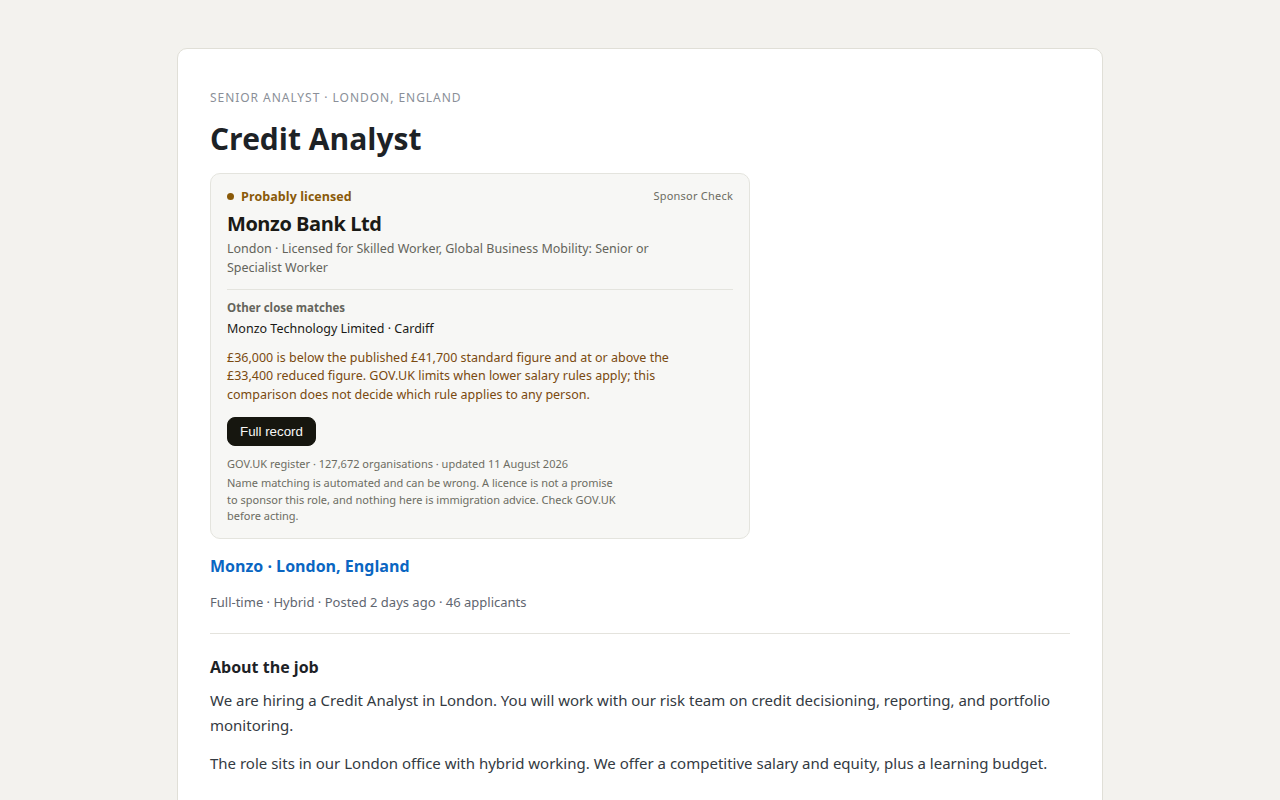
Our product. Sponsor Check is the browser extension sold by THINKINGAI LIMITED, the company identified in this site's footer. The register itself remains free, official, and public. This site is information only, not immigration advice.